Create Professional
Invoices & Quotations
in Seconds
Send GST, Non-GST invoices, share quotations instantly, and track every payment and due amount, right inside the CRM where your leads and customers already live.


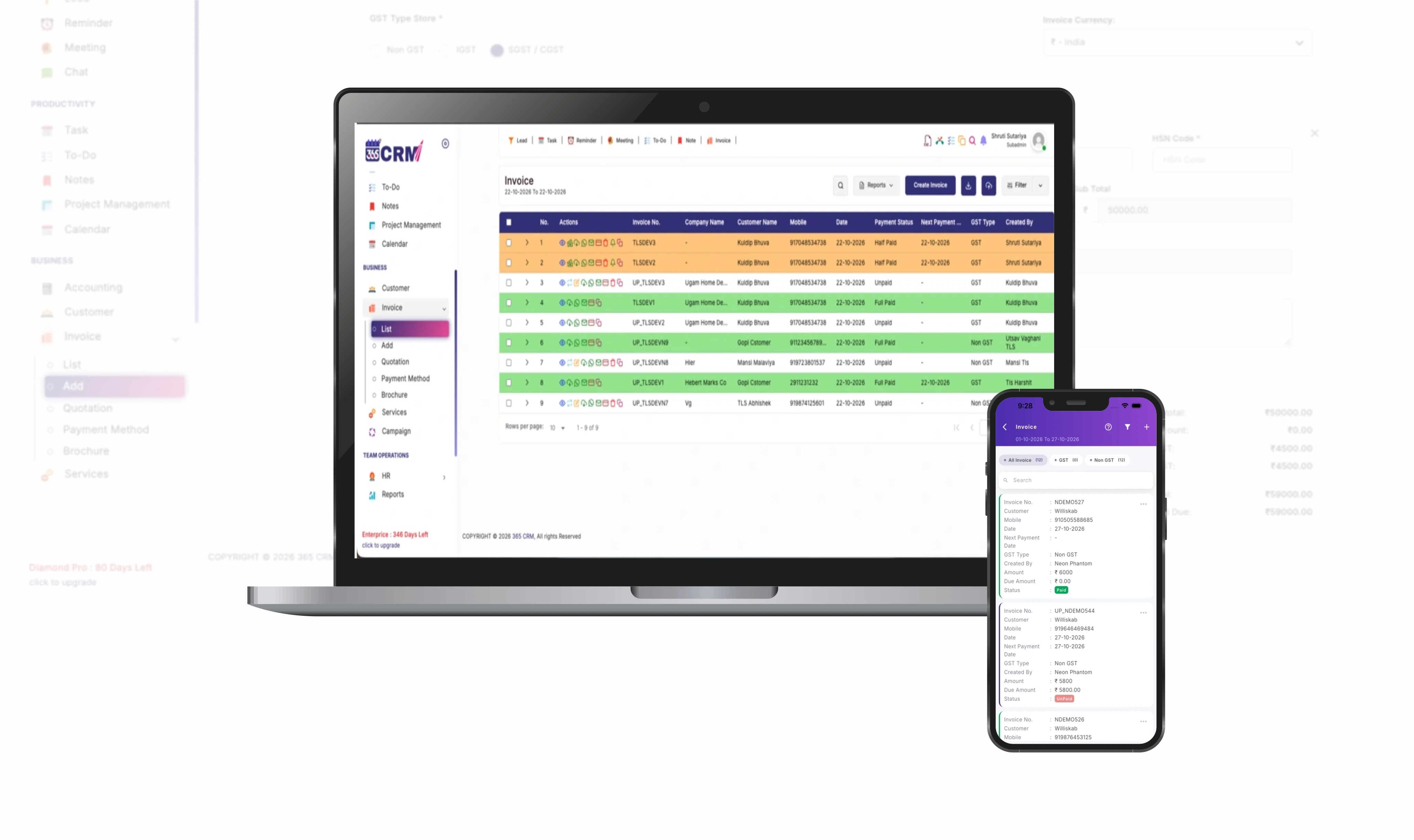
The Problem with Manual Billing
Scattered Billing Records
Quotations in one file, invoices in another, payment notes in a diary. Nobody has the full picture of a customer's account.
Slow Quotations Lose Deals
When a quotation takes hours to prepare and send, the customer has already spoken to a faster competitor.
Forgotten Payment Follow-Ups
Without due dates and reminders, pending payments are noticed only when cash flow is already hurting.
Calculation & Tax Errors
Manual GST, discount and total calculations lead to mistakes, re-work and awkward corrections with clients.
The 365 CRM Solution
Everything You Need for
Billing & Quotations
A complete set of powerful billing and quotation tools designed for high-performance sales teams — transparent, accurate, and built for scale.
GST & Non-GST
Create SGST/CGST or IGST invoices for registered GST customers, Non-GST invoices for unregistered buyers for international accounts. Tax-inclusive pricing is supported too.
Instant Quotations
Prepare a professional quotation in minutes and share it with the customer straight away. Attach your company brochure along with the quote in a single click.
1-Click Quotation to Invoice
When the customer approves, convert the quotation into an active invoice with a single tap. All line items, taxes, discounts, and customer details carry over instantly.
Payment Tracking
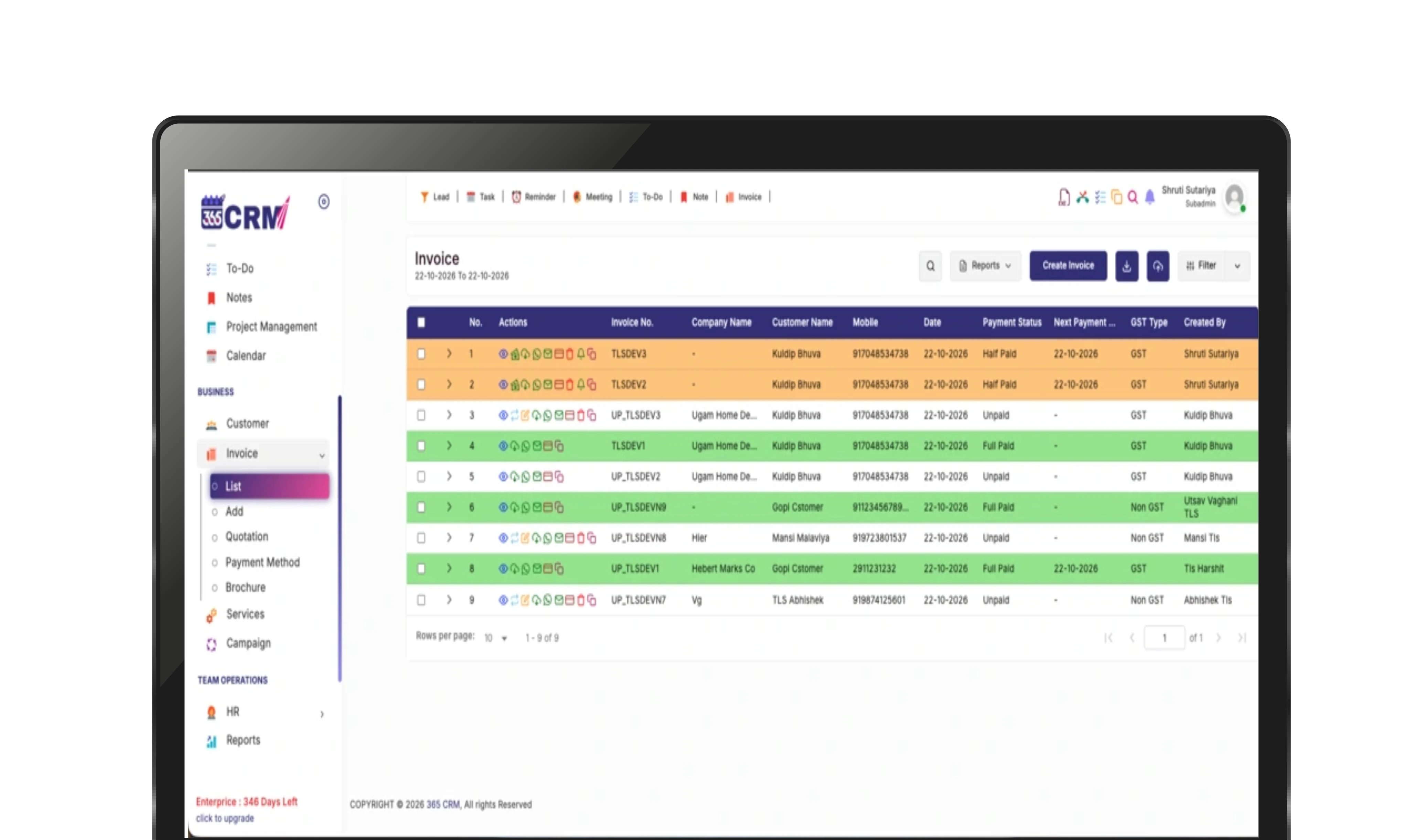
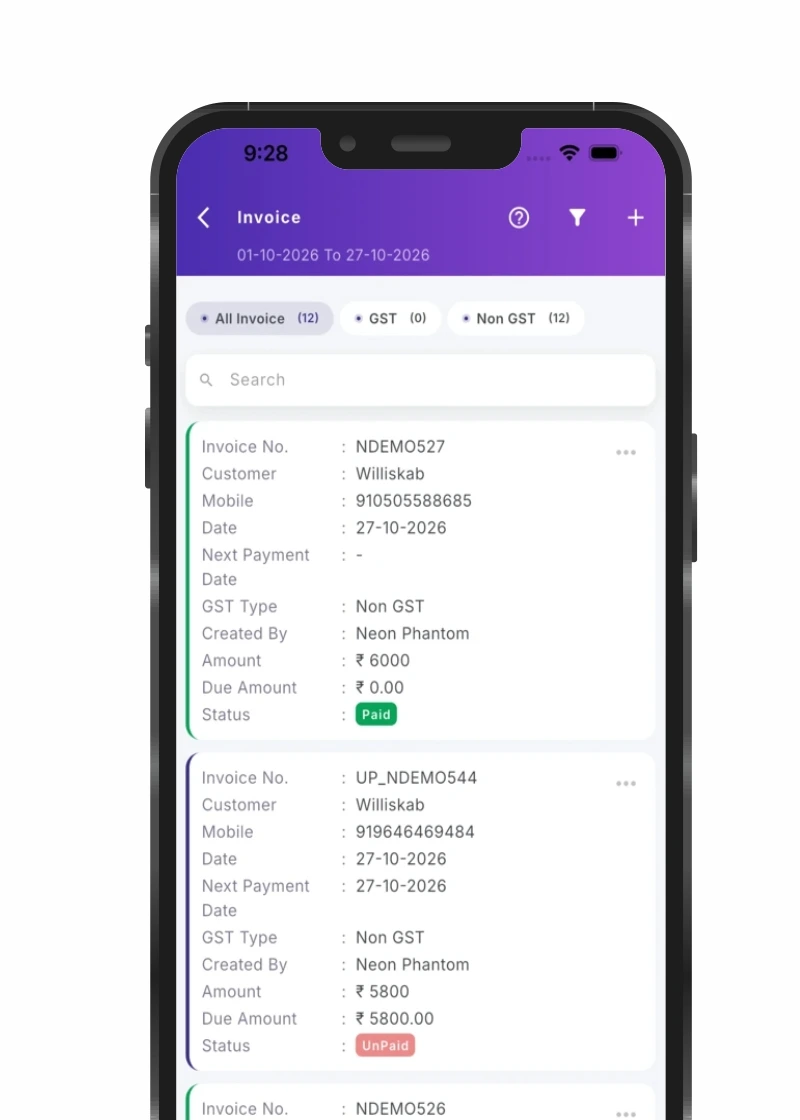
Record full or part payments with date, amount, and payment method. Each invoice displays clear Paid, Half Paid, or Unpaid badges with real-time due balances.
Payment Reminders & Next Date
Set a next payment date on every pending invoice and send a customized payment reminder message to the customer on WhatsApp or email when it is due.
Share on WhatsApp & Email
Send the PDF on WhatsApp or email, or download it. Turn on WhatsApp and Email automation to send copies automatically whenever an invoice is generated.
Your Brand on Every Invoice
Choose an invoice design template and add your custom prefix, starting number, bank details, authorized signature, and terms & conditions once.
Flexible Discounts & Multi-Currency
Apply discounts per line item or across the overall bill, add HSN/SAC codes, and bill domestic or overseas clients in the currency you choose.
Smart Search & Filters
Find any invoice by customer, staff, date range, or next payment date. Sort the list and save your favourite filters for instant daily billing reporting.
Ready to Optimize Your Billing Operations?
Get in touch to see how 365 CRM Invoice & Quotation software can transform your billing efficiency and cash flow.
Get Started in 4 Simple Steps
From invoice setup to recording payments — the entire process takes minutes.
Set Up Once
In Web Setting > Invoice Setting, choose your template, prefix, starting number, currency, bank details, signature and terms.
Create Quotation or Invoice
Pick a customer, choose GST or Non-GST, add products with prices, taxes and discount, then tap Generate.
Share with Customer
Send the PDF on WhatsApp or email. When the quote is approved, convert it into an invoice with one click.
Track Payments
Add a payment entry whenever money arrives, set the next payment date, and send reminders until fully settled.
See Invoicing & Quotations in Action
A clean, intuitive billing workspace that gives teams and accountants everything they need at a glance.
Why Top Teams Choose
365 CRM Billing
Experience a more productive billing lifecycle where quotations close deals faster and payments are tracked without friction.
Accelerated Deal Closures
Create quotations in under two minutes and share them on WhatsApp while the customer is still interested.
Zero Calculation & Tax Errors
Automated SGST/CGST, IGST and itemized discount calculations prevent costly accounting mistakes.
Predictable Cash Flow
Next payment date tracking and timely payment reminder alerts ensure overdue amounts are collected on schedule.
Join over 3,500 growing businesses worldwide scaling with 365 CRM.
Ready to Simplify Your Invoicing & Quotations?
Get in touch to see how 365 CRM Invoice & Quotation software can accelerate your sales cycles and collections.
Comprehensive Billing Capabilities
Explore every supported billing action, configuration, and feature available in 365 CRM.
| Area | What The User Can Do |
|---|---|
| Invoice Types | GST (SGST/CGST or IGST), Non-GST invoices. Option to enter product price inclusive of tax. |
| Quotation | Create a quotation in the same form as an invoice, share it, and convert it to a paid invoice later. |
| Customer Details | Select an existing customer or add a new one while billing. Customer name, company, mobile, email, address and GST number appear on the invoice. |
| Products | Add multiple items with product name, detail, HSN code, quantity, cost, tax and discount. |
| Discount | Per-item discount or overall discount on the bill. |
| Currency | Choose the invoice currency for each invoice; set a default in settings. |
| Payment | Payment method, paid amount, due amount, next payment date; add or update payment entries any time. |
| Status | Paid, Half Paid, Unpaid. |
| Sharing | View, download PDF, send to WhatsApp, send by email, add extra mobile numbers to receive the invoice. |
| Automation | WhatsApp Automation and Email Automation send the invoice copy automatically as soon as it is generated. |
| Reminders | Send payment reminder with a custom message for pending invoices. |
| Invoice Actions | Edit invoice, copy invoice, cancel invoice, payment entry, payment details. |
| List & Filters | Filter by staff, customer, date range and next payment date range; sort; save filters. |
| Settings | Invoice template, prefix, start number, currency & HSN/SAC code, GST percentage, bank name, account number, IFSC/SWIFT code, signature, terms & conditions, payment history display. |
| Extras | Attach a brochure, add a comment/note on the invoice. |
More Reasons Teams Choose 365 CRM Billing
Trusted by Fast-Growing Businesses
Thousands of businesses rely on 365 CRM to create professional invoices, close quotations, and track daily payments.
Thank you so much 365 CRM and team to provide wonderful solutions for business automation and management about company and staff and even about my personal events and calendar.

365 CRM is actually very good, making it easy for small and medium-sized businesses to track leads and respond to them on time. To me, CRM has the potential to 10x a company's income. I would strongly propose startups that would be ideal for you.
Awesome experience with 365 Team Management application. it's make easy to our life for day to day activities which was challenge for our business. Good supporting system and customer care as well as.
CRM that is highly recommended The customer service was excellent. They were quite helpful in guiding me and answering all of my inquiries.
Great service support. I'm so happy. Thank you 365 CRM team
Awesome experience with 365 Team Management application. it's make easy to our life for day to day activities. Best service ever.
We were lacking in follow-up management. We only tried the 365 CRM free trial at first, but we subsequently profited from ts follow-up on-time reminder. Eventually, we were able to convert more leads. We now use 365 crm on a regular basis.
If you are looking for a crm, this is the greatest one. Here are some of the reasons why. * You CAN track your leads and follow-ups; it also indicates in red when you fail to follow-up on your leads.* LEADS CAN BE FETCHED FROM YOUR RESPECTIVE SOURCE and directly sent automatically with alternate lead assigned to team. * MONITORING YOUR SALES IS VERSY EASY.
When looking for a strategic IT-partner for the development of a corporate CRM solution, we chose 365 CRM System. The company proved itself a reliable provider of IT services. And also team is very supportive. Thank you for the best service.
Superb service and the way you guys have coordinate is wow. I will surely recommend to other friends of mine who are also entrepreneurs
I really like using 365 CRM for my business. It's easy to use, and it helps me keep track of my leads. The automatic reminders are handy, and the reports give me useful information. The customer support is good too - they're quick to help when I have questions. I recommend it!
There is a problem in this CRM...I have been using it for a long time...I have not been able to add the calling system, or the second follow up date or time has not come in the age line, even when you Follow up has to be seen to see the lead up and down of the entire system...in which time more time is wasted,,,experience is true compared to other CRM....
I am happy as of now with the process explained to me. Software is easy accessible with easy interface. I am delighted by post sales service i.e Trainning and Support especially by Preeti Mam.. Thank You
365 CRM Software is a powerful tool for streamlining sales processes and enhancing customer relationships. With features like lead scoring, automation, and reporting, it helps businesses improve efficiency and close deals faster. While it may have a learning curve, its user-friendly interface and strong customer support make it a valuable asset for many organizations.
Connected with the Entire 365 CRM Suite
Invoicing works best when it's integrated with your complete customer lifecycle.