Boost Team Efficiency with Smart Staff Management
365 CRM is a complete staff management software built for Indian businesses — a staff management CRM that helps you organize departments, define roles, delegate tasks, and manage attendance, all in one place.




The Problem With Unstructured Staff Management
Unclear Roles
Without defined roles, employees aren't sure of their priorities or contributions.
Manual Attendance Tracking
Spreadsheet-based attendance is error-prone and slow to report on.
Scattered Employee Data
Staff details, departments, and holidays live in different files or tools.
Inconsistent Processes
Without documented SOPs, work quality varies from person to person.
The 365 CRM Solution
A Staff Management System Built for Accountability at Every Level
Staff management is the strategic process of leading and overseeing employees to ensure productivity aligns with organizational goals. A staff management system aids in recruiting the right talent, onboarding effectively, and fostering growth through training. Using staff management software or a staff performance management system, roles are defined, tasks delegated based on skills, and performance expectations set.
A staff data management system ensures efficient handling of employee information, while a staff management CRM supports communication and accountability — from department structure to holidays, attendance, and SOPs.
- → Recruitment & Onboarding — hire and set up new employees for success
- → Role Clarity & Task Delegation — align tasks with employee strengths
- → Ongoing Development — continuous training to boost productivity
- → Performance Monitoring & Feedback — assess and drive growth
- → Communication & Conflict Resolution — maintain a collaborative environment
Ready to Modernize Your HR?
Get in touch with our team for a personalized demo of the Staff Management module.
Everything You Need to Manage Your Team
A complete employee management system designed for growing sales and service teams.
Recruitment & Onboarding
Hire the right talent and onboard effectively to set new employees up for success from day one.
Role Clarity & Task Delegation
Define roles clearly and align tasks with employee strengths so everyone understands their priorities.
Ongoing Development
Provide continuous training and development to enhance skills and motivate employees.
Performance Monitoring
Regularly assess performance, offer constructive feedback, and ensure goals are met.
Communication & Conflict Resolution
Foster clear communication and address conflicts promptly for a positive work environment.
Recognition & Motivation
Recognize achievements and offer career growth opportunities to keep employees engaged and retained.
Streamline HR, Maximize Productivity
Ready to transform your HR operations? Get in touch for a personalized demo.
Everything You Can Manage in One Place
Beyond strategy, 365 CRM's staff management module handles the daily admin work too.

Add Staff
Go to Staff, click Add Staff, and submit — new employees are set up in seconds.
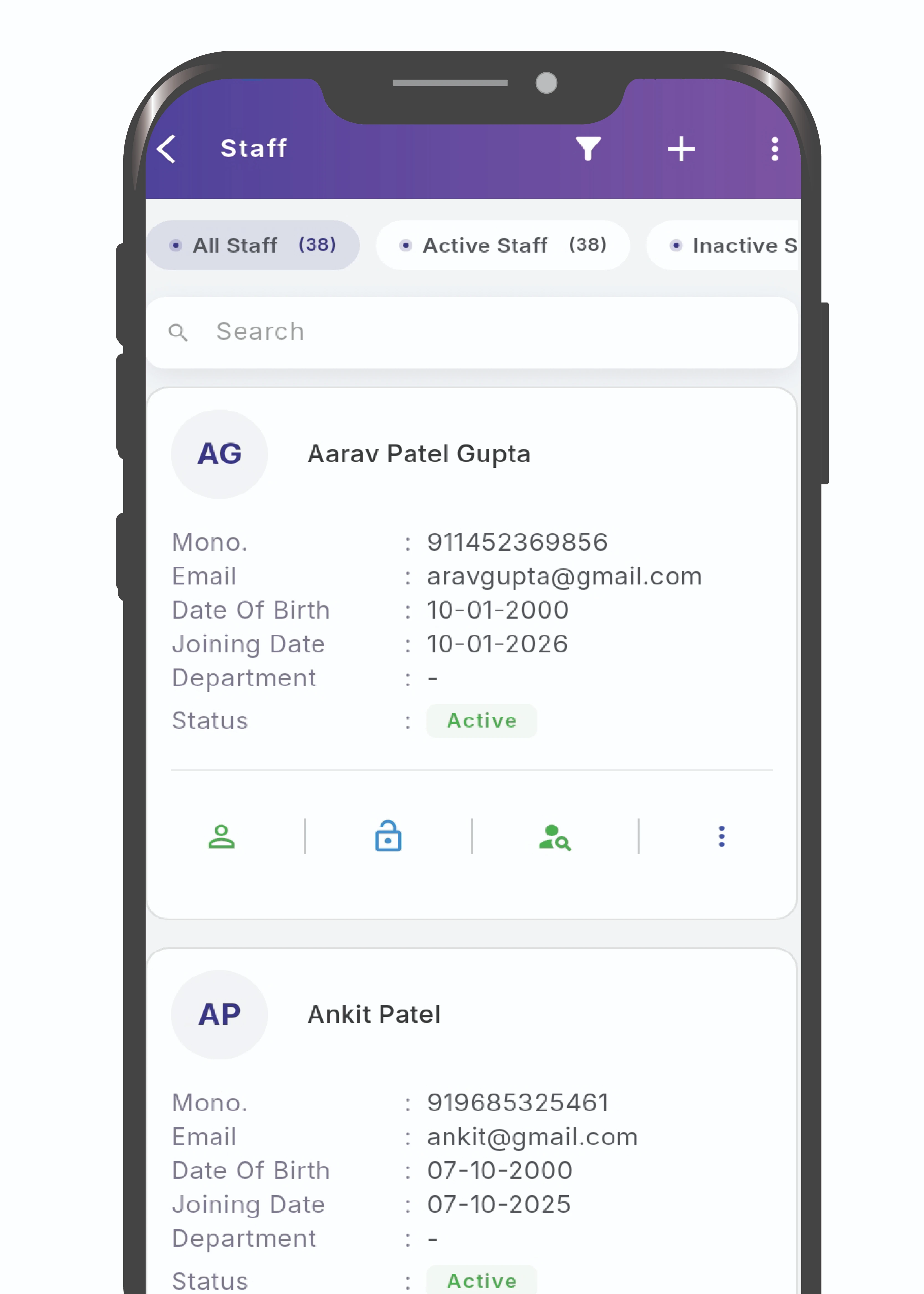
Activate / Deactivate Staff
Monitor daily attendance, tasks, and leave requests effortlessly.
Add Holidays
Manage company holidays centrally from the Holidays section.
Attendance Reports
Select a staff member and date range, then export the attendance report directly.
Add Department
Structure your organization by creating departments in a few clicks.
Add SOP
Document standard operating procedures so processes stay consistent across the team.
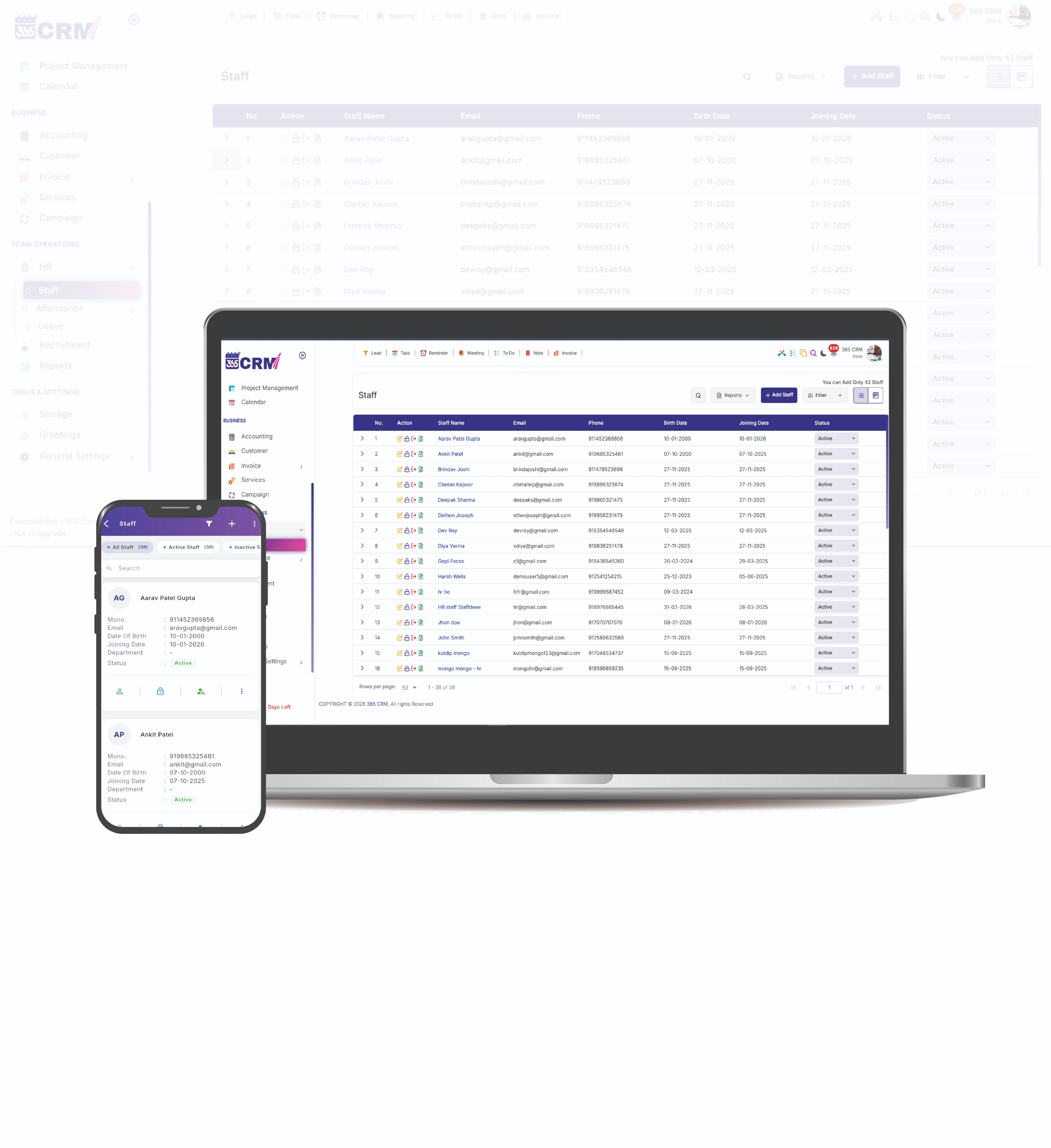
Staff Management Overview
Everything you need to manage your team — all in one place.
Built to Keep Your Team
Aligned and Growing
Good staff management isn't just admin —
it's what keeps a growing team pointed in the same direction.
Aligned Goals
Ensures all employees are working toward the same organizational objectives.
Clear Expectations
Helps define roles and delegate tasks effectively, boosting productivity.
Employee Development
Provides growth opportunities that improve skills and job satisfaction.
Improved Communication
Strengthens relationships and reduces conflicts within teams.
Ready to Streamline Your HR Operations?
Get in touch with our team to learn how 365 CRM can help you manage staff, track performance, and drive growth.
Staff Management Connected to Your Whole CRM
Most HR tools live disconnected from your sales and service data. As a staff management CRM, 365 CRM ties employee roles, departments, and performance directly to the leads and tasks they work on — one system, not three.
- Add and manage staff in seconds
- Department and SOP management built in
- Exportable attendance reports by staff and date
- Reassign leads instantly when deactivating staff
- No separate HR tool subscription needed
See What Our Community Says
Real feedback from HR managers and business owners who have transformed their workforce management.
Ready to Streamline Your HR Operations?
Get in touch with our team to learn how 365 CRM can help you manage staff, track performance, and drive growth.
Trusted by HR Teams Worldwide
Thousands of businesses rely on 365 CRM to manage their workforce operations every day.
Thank you so much 365 CRM and team to provide wonderful solutions for business automation and management about company and staff and even about my personal events and calendar.

365 CRM is actually very good, making it easy for small and medium-sized businesses to track leads and respond to them on time. To me, CRM has the potential to 10x a company's income. I would strongly propose startups that would be ideal for you.
Awesome experience with 365 Team Management application. it's make easy to our life for day to day activities which was challenge for our business. Good supporting system and customer care as well as.
CRM that is highly recommended The customer service was excellent. They were quite helpful in guiding me and answering all of my inquiries.
Great service support. I'm so happy. Thank you 365 CRM team
Awesome experience with 365 Team Management application. it's make easy to our life for day to day activities. Best service ever.
We were lacking in follow-up management. We only tried the 365 CRM free trial at first, but we subsequently profited from ts follow-up on-time reminder. Eventually, we were able to convert more leads. We now use 365 crm on a regular basis.
If you are looking for a crm, this is the greatest one. Here are some of the reasons why. * You CAN track your leads and follow-ups; it also indicates in red when you fail to follow-up on your leads.* LEADS CAN BE FETCHED FROM YOUR RESPECTIVE SOURCE and directly sent automatically with alternate lead assigned to team. * MONITORING YOUR SALES IS VERSY EASY.
When looking for a strategic IT-partner for the development of a corporate CRM solution, we chose 365 CRM System. The company proved itself a reliable provider of IT services. And also team is very supportive. Thank you for the best service.
Superb service and the way you guys have coordinate is wow. I will surely recommend to other friends of mine who are also entrepreneurs
I really like using 365 CRM for my business. It's easy to use, and it helps me keep track of my leads. The automatic reminders are handy, and the reports give me useful information. The customer support is good too - they're quick to help when I have questions. I recommend it!
There is a problem in this CRM...I have been using it for a long time...I have not been able to add the calling system, or the second follow up date or time has not come in the age line, even when you Follow up has to be seen to see the lead up and down of the entire system...in which time more time is wasted,,,experience is true compared to other CRM....
I am happy as of now with the process explained to me. Software is easy accessible with easy interface. I am delighted by post sales service i.e Trainning and Support especially by Preeti Mam.. Thank You
365 CRM Software is a powerful tool for streamlining sales processes and enhancing customer relationships. With features like lead scoring, automation, and reporting, it helps businesses improve efficiency and close deals faster. While it may have a learning curve, its user-friendly interface and strong customer support make it a valuable asset for many organizations.
Need help setting up your HR process?
Get in touch with our support team.
Frequently Asked Questions
Everything you need to know about the Staff Management module. Can't find the answer? Contact our team.
Go to Attendance Report, select the staff member and date range, and export the report directly from the same screen.
Yes. You can add departments from Department > Add Department, and add standard operating procedures from SOP > Add SOP.
Go to Staff > Active and Deactive Staff, select the staff member, and update their status. When deactivating, you can also assign their leads to another staff member.
Go to Staff, click Add Staff, fill in the details, and submit.
Yes. Go to Holidays, click Add Holiday, fill in the details, and submit.