Automatically Capture & Organize Calls with
Every Lead
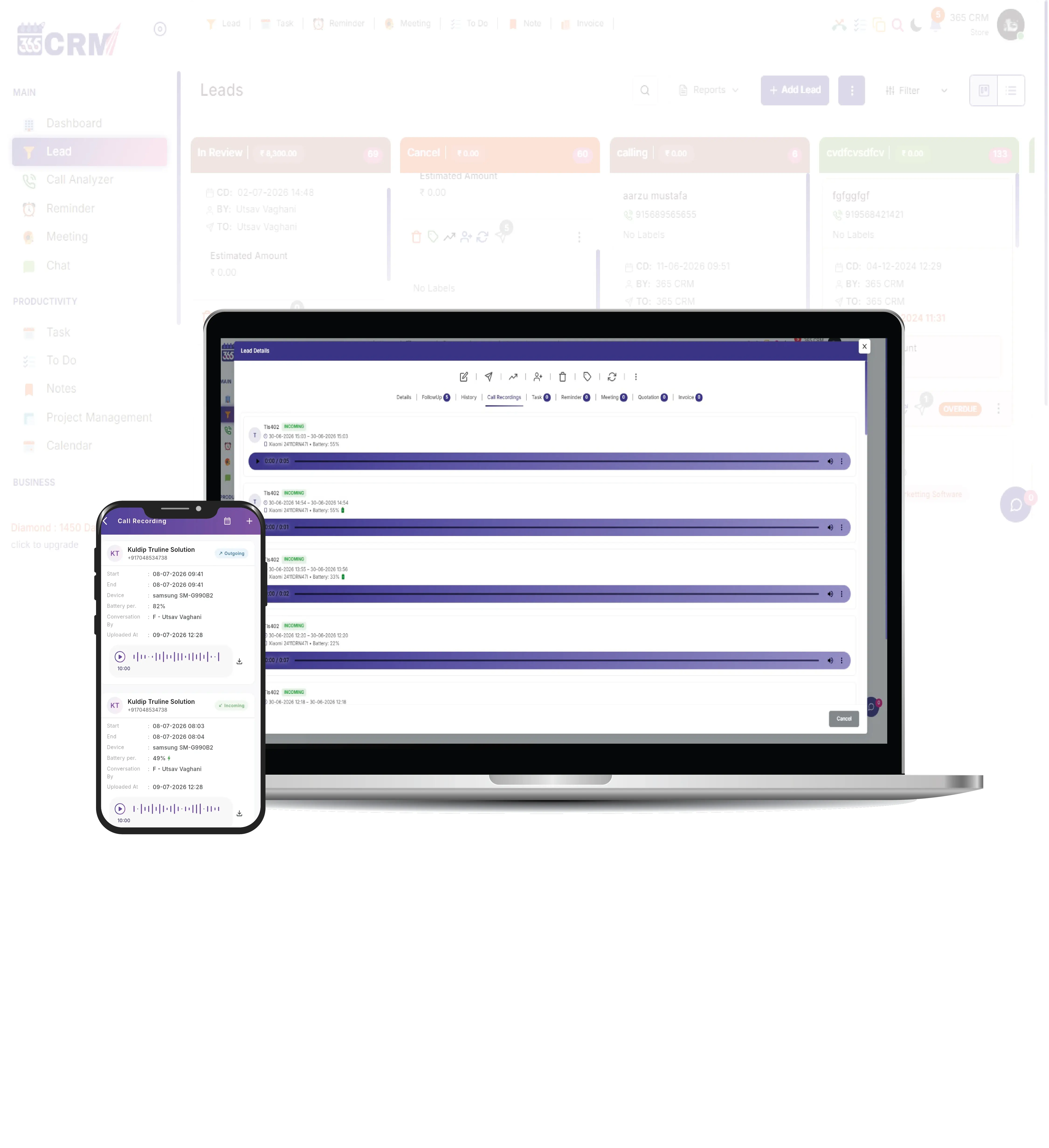
Never lose an important customer conversation again. 365 CRM automatically detects your team's Android call recordings, securely syncs them in the background, and attaches each one to the exact lead — with zero manual effort from your staff.




The Problem with Untracked Calls
Lost Conversations
Important sales calls stay trapped on individual agent devices. Managers cannot review, coach, or verify what was discussed with a customer — ever.
Missed Follow-Ups
Without call history attached to a lead, agents forget exact customer requests and promises. Follow-ups are guesswork instead of informed action.
No Quality Monitoring
Without recordings, managers cannot audit agent interactions, identify coaching opportunities, or maintain consistent service quality across the team.
The 365 CRM Solution
Everything You Need to
Track Calls
A complete set of powerful call tracking tools designed for high-performance teams — transparent, secure, and built for scale.
Intelligent File Detection
The app automatically scans known recording folders across all major Android brands — Xiaomi, Samsung, Vivo, Oppo, Realme and more — to find the right file instantly. Supports .mp3, .m4a, .amr, .wav, .aac, .3gp, .ogg, and .opus formats.
Background Synchronization
Recordings sync even when the app is closed. A background receiver queues all calls made while the app is inactive, then uploads them automatically the next time the app is opened — no call is ever missed.
Automatic Lead Matching
The system matches each recording to the exact lead using the caller's number. If the call was made directly from a lead profile inside the app, it is matched instantly. For dialer calls, the number is verified against the CRM database in real time.
Admin Permission Control
Call recording sync activates only for staff members who have been explicitly approved by an administrator. Non-approved users have zero sync activity — ensuring complete control over who is monitored.
Built-in Audio Playback
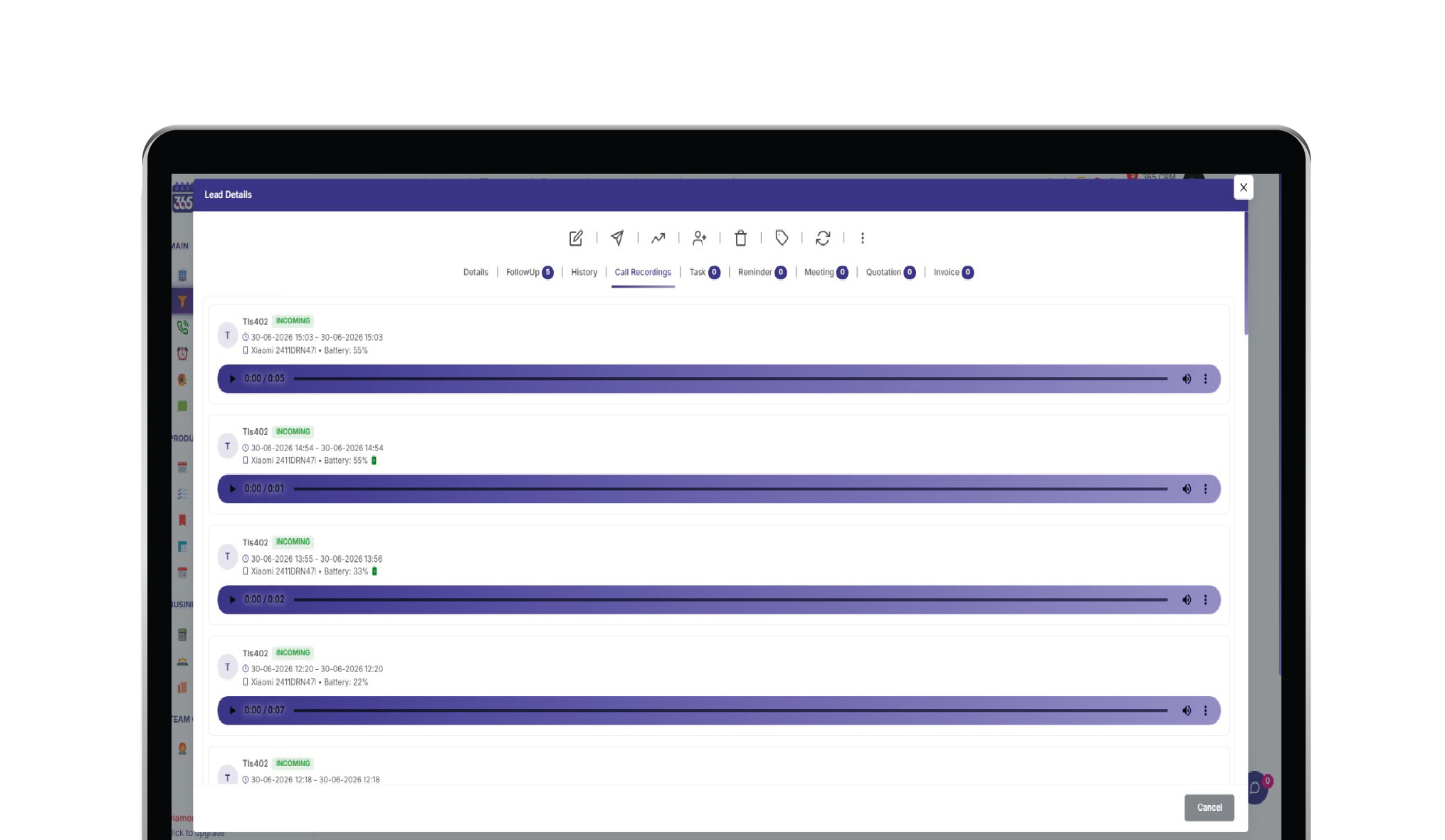
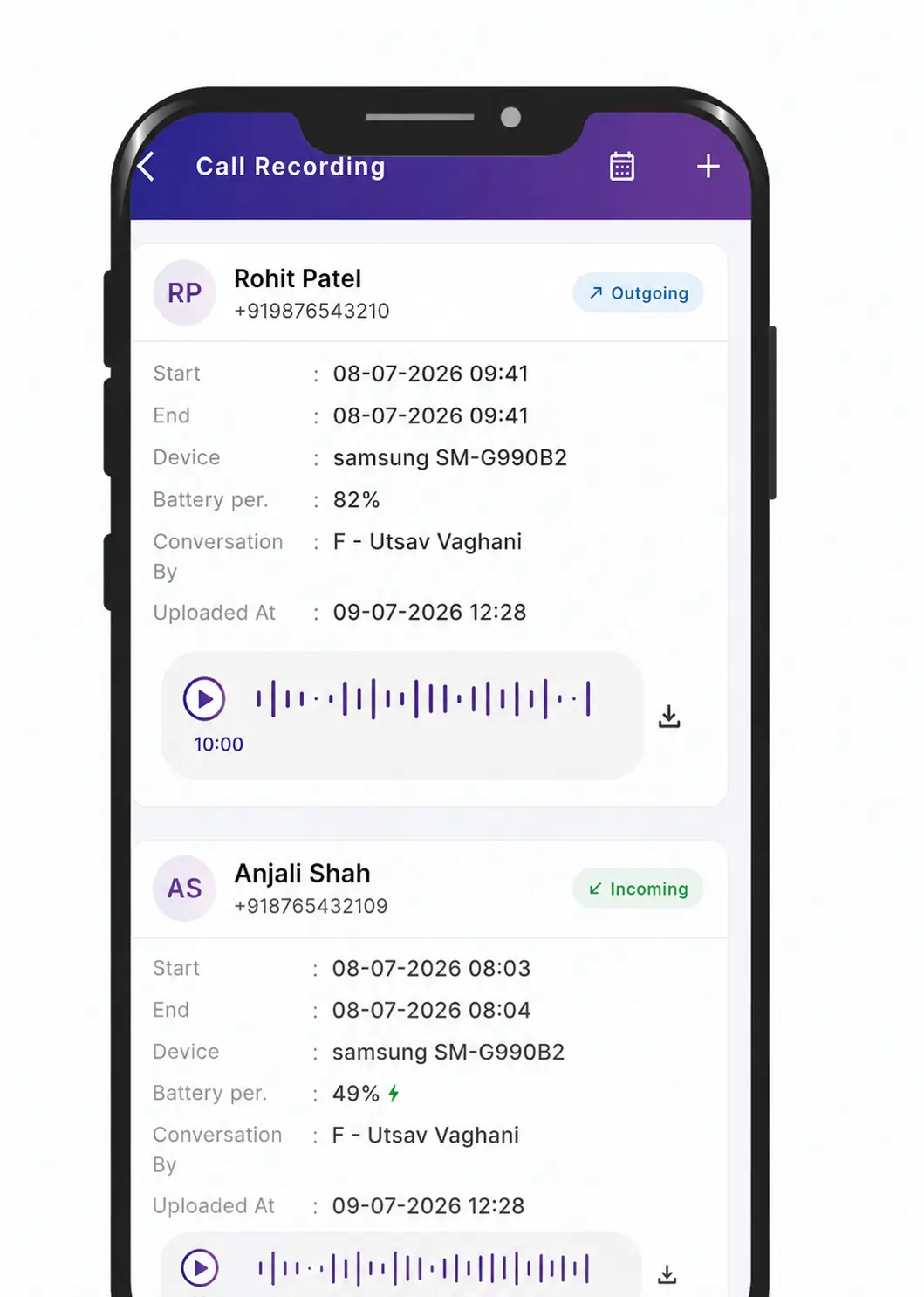
Every synced recording is playable directly inside the app — no downloads, no third-party players needed. Open any lead profile, tap a recording, and listen instantly. Supports all common formats including AMR, M4A, and MP3 natively.
Duplicate Prevention
Every call is tracked by its unique combination of number, start time, and call type. The system ensures that even if a background and foreground sync overlap, the same recording is never uploaded twice — keeping your storage clean.
Ready to Track Every Call Automatically?
Get in touch to see how 365 Call Recording can transform your team's accountability.
Zero Manual Effort
From making a call to reviewing it on the dashboard, the entire process is automated.
Call Happens
Staff makes or receives a call on their Android device. The phone's built-in dialer records the audio automatically — no third-party app needed.
App Detects
The moment the call ends, the CRM app receives a signal. It reads the call log, identifies the number, duration, type, and locates the matching audio file — all within half a second.
Secure Upload
The recording file, along with call details (number, time, type, device, battery status), is securely uploaded to the server and matched to the correct lead profile.
Instant Playback
Managers can open any lead profile, see the full call recording history, and listen directly inside the app — with a built-in audio player. No downloads needed.
Ready to Optimize Your Team’s Performance?
Experience the power of seamless team management with 365 Call Recording. Get in touch to see how we can transform your team’s productivity.
Technical Architecture & Requirements
Before enabling this feature, please review the following technical requirements to ensure a smooth setup for your team.
Android Devices Only
This feature works exclusively on Android phones. Apple's iOS does not permit apps to access call logs or audio recordings during active calls. iPhone users cannot use this feature.
Enable Native Call Recording First
Before the CRM can sync anything, the user must turn ON call recording inside their phone's default dialer settings. If recording is off, no file is created and nothing can be synced.
App Does Not Record — Phone Does
Google's policy prevents any standard Android app from recording calls directly. Instead, 365 CRM reads the audio files already created by your phone's own built-in call recorder — no third-party software is involved.
Admin-Approved Staff Only
The backend administrator assigns Call Recording permission per staff member. Only approved users have sync enabled. No staff member is automatically enrolled — the admin decides who is included.
Granular Privacy & Controls
Your team gets complete control over what gets synced to the server. Nothing happens without explicit permission.
Enable Native Call Recording First
Before the CRM can sync anything, the user must turn ON call recording inside their phone's default dialer settings. If recording is off, no file is created and nothing can be synced.
Manual Folder Selection
If auto-detection fails, users can manually select their device's specific recording folder path for precise control.
Admin Permission Gate
Only users explicitly approved by the administrator will have their calls synced. There are zero opt-in risks for non-approved users.
Built-in Playback Experience
Review call histories directly from the dashboard with an integrated, seamless audio player interface.
Why Top Teams Choose
365 CRM Call Recording
Measurable impact on your sales pipeline, team accountability, and customer experience.
Sales Coaching & QA
Managers can listen to successful calls to train new hires, and review calls that did not convert to identify coaching opportunities — directly inside the lead profile, without chasing agents for recordings.
Centralized Call History
Every call a lead has ever had with your team is stored in one place. Open any lead, see the full recording list filtered by date, and get instant context before the next follow-up call.
Team Accountability
Verify that follow-ups actually happened. Managers can confirm call quality, check that promises were kept, and maintain consistent professional standards across the entire sales team.
Get Instant Access to 365 Call Recording
Schedule a quick walkthrough to see 365 Call Recording in action and discover how it can transform your team's accountability.
What Our Community Says
Real feedback from project managers and business owners who have transformed their workflows.
Get Instant Access to 365 Call Recording
Talk to our expert to see how 365 Call Recording can transform your team’s productivity and accountability
Hear From Our Users
Don't just take our word for it. See how teams across industries are using 365 CRM to improve efficiency, accountability, and customer service.
Thank you so much 365 CRM and team to provide wonderful solutions for business automation and management about company and staff and even about my personal events and calendar.

365 CRM is actually very good, making it easy for small and medium-sized businesses to track leads and respond to them on time. To me, CRM has the potential to 10x a company's income. I would strongly propose startups that would be ideal for you.
Awesome experience with 365 Team Management application. it's make easy to our life for day to day activities which was challenge for our business. Good supporting system and customer care as well as.
CRM that is highly recommended The customer service was excellent. They were quite helpful in guiding me and answering all of my inquiries.
Great service support. I'm so happy. Thank you 365 CRM team
Awesome experience with 365 Team Management application. it's make easy to our life for day to day activities. Best service ever.
We were lacking in follow-up management. We only tried the 365 CRM free trial at first, but we subsequently profited from ts follow-up on-time reminder. Eventually, we were able to convert more leads. We now use 365 crm on a regular basis.
If you are looking for a crm, this is the greatest one. Here are some of the reasons why. * You CAN track your leads and follow-ups; it also indicates in red when you fail to follow-up on your leads.* LEADS CAN BE FETCHED FROM YOUR RESPECTIVE SOURCE and directly sent automatically with alternate lead assigned to team. * MONITORING YOUR SALES IS VERSY EASY.
When looking for a strategic IT-partner for the development of a corporate CRM solution, we chose 365 CRM System. The company proved itself a reliable provider of IT services. And also team is very supportive. Thank you for the best service.
Superb service and the way you guys have coordinate is wow. I will surely recommend to other friends of mine who are also entrepreneurs
I really like using 365 CRM for my business. It's easy to use, and it helps me keep track of my leads. The automatic reminders are handy, and the reports give me useful information. The customer support is good too - they're quick to help when I have questions. I recommend it!
There is a problem in this CRM...I have been using it for a long time...I have not been able to add the calling system, or the second follow up date or time has not come in the age line, even when you Follow up has to be seen to see the lead up and down of the entire system...in which time more time is wasted,,,experience is true compared to other CRM....
I am happy as of now with the process explained to me. Software is easy accessible with easy interface. I am delighted by post sales service i.e Trainning and Support especially by Preeti Mam.. Thank You
365 CRM Software is a powerful tool for streamlining sales processes and enhancing customer relationships. With features like lead scoring, automation, and reporting, it helps businesses improve efficiency and close deals faster. While it may have a learning curve, its user-friendly interface and strong customer support make it a valuable asset for many organizations.
Get Instant Access to 365 Call Recording
Talk to our expert to see how 365 Call Recording can transform your team’s productivity and accountability
Common Questions
No. Apple's iOS strictly prevents apps from accessing call logs or recording active phone calls due to its privacy policies. This feature is exclusively available on Android devices where the native phone app supports call recording.
No. Google's policy prevents any standard Android app from directly recording phone calls. 365 CRM reads the audio files already created by your phone's own built-in call recorder. This means call recording must be enabled inside your phone's native dialer settings before anything can be synced.
No. A background receiver captures calls even when the app is closed and queues them for upload. The next time the app is opened, all pending recordings are uploaded automatically — one by one, in order.
No. The app only syncs calls whose numbers match an existing lead in your CRM. Any call from a number not in your lead database is automatically ignored and never uploaded to the server.
You can manually select your phone's recording folder inside the Call Recording Folder settings screen. The app shows which folder is currently being used and lets you point it to the correct location on your device.
The recording is skipped entirely and not uploaded. Only calls whose numbers match an existing lead in your CRM are synced to the server. Calls from unknown numbers are always ignored.