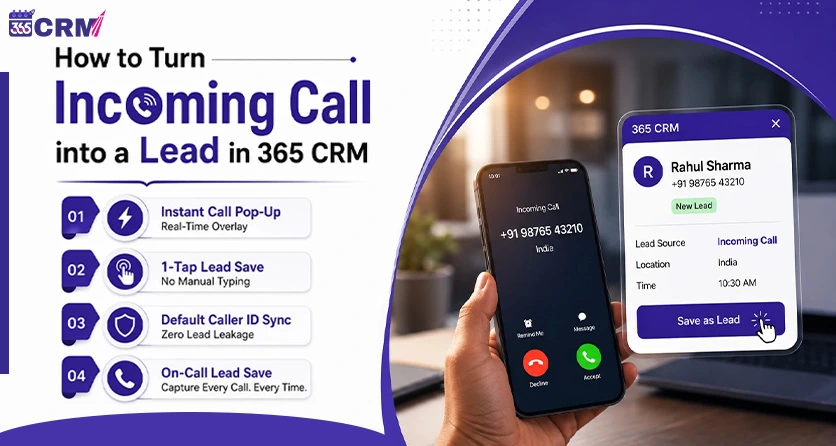
How to Turn Incoming Call into a Lead in 365 CRM
Every unknown number that calls your business is a potential customer — but most sales teams still lose that opportunity the old-fashioned way: they take the call, forget to save the number, and the lead disappears into the call log forever.
This is exactly the gap incoming call lead creation is built to close. Instead of manually typing a caller's number into a spreadsheet or CRM after the call ends (if anyone remembers to), the system does it automatically, in real time, the moment the phone rings.
In this guide, we'll walk through how 365 CRM's call-to-CRM lead capture feature works on Android, how to set it up in under two minutes, and why this kind of cloud telephony CRM lead creation is becoming a deciding factor for Indian sales teams choosing between CRM apps in 2026.
Why Businesses Are Searching for Better Inbound Call Lead Tools
If you've ever searched for the best CRM for lead management, chances are call handling was part of the problem. Phone calls remain one of the highest-intent channels for service businesses, real estate agencies, B2B firms, and field sales teams — but they're also the easiest channel to lose leads in.
Traditional Manual Lead Entry vs. 365 CRM Add Lead Pop-up
| Feature / Aspect | Traditional Manual Process | 365 CRM Add Lead Pop-up |
| Lead Capture Speed | Takes 2 to 5 minutes after the call ends | Instant (1-Tap during or right after call) |
| Lead Entry Accuracy | High chance of human error & missed entries | 100% Accurate (Auto-detects caller number) |
| Lead Leakage Risk | High (Unsaved numbers get lost in call logs) | Zero Lead Leakage (Popup triggers for every unknown caller) |
| Caller ID Integration | No native connection with CRM database | Smart Caller ID overlay directly synced with CRM |
| Team Efficiency | Reps waste time manually typing & switching apps | Eliminates manual entry; sales team focuses on closing |
| Immediate Follow-up | Delayed (often forgotten by end of day) | Immediate (Assign tasks/notes while context is fresh) |
The common friction points:
- Missed inquiries — an unsaved number gets buried in the phone's call log within hours.
- Delayed response — by the time a rep opens the CRM to manually log the call, the caller's context is already forgotten.
- Inaccurate records — requirements mentioned on the call never make it into any system.
An incoming call-to-lead CRM workflow removes all three problems by capturing the lead the instant the call happens — not after.
Getting this working takes three short steps on any Android device.
Step 1: Install the App
Search for 365 CRM on the Google Play Store and tap Install. The app is free to download.
Step 2: Grant Initial Permissions
On first launch, 365 CRM asks for a few permissions that power unknown caller create new lead CRM detection:
- Phone Call Logs — to detect incoming numbers in real time
- Contacts — to check whether the number already exists in your database
- Make & Manage Calls — to enable direct call tracking inside the app
Step 3: Set 365 CRM as Default Caller ID & Spam App
This is the step that actually enables the screen pop, incoming call, caller ID, and create lead overlay. Android requires an app to be set as the default caller ID handler before it's allowed to show a pop-up during incoming calls.
When prompted, select 365 CRM and tap Set as default.
What if you skip this by accident? 365 CRM will re-prompt you to set it as default every time you reopen the app, until it's enabled — so your India telephony CRM incoming call pop-up create lead setup never silently stops working.
Once setup is complete, the system runs automatically in the background — no manual steps needed on every call.
1. Incoming call detection — an unknown number calls your phone.
2. Database check — 365 CRM instantly checks whether that number already exists in your CRM.
3. Call pop-up with create lead option — if it's a new number, a pop-up appears live on your screen, either while the phone rings or during the call.
4. One-tap lead save — tap Add Lead, and the caller's details are saved directly into your 365 CRM dashboard.
No typing. No sticky notes. No "I'll add it later and forget."
Why This Matters More Than It Sounds
1. Zero Lead Leakage — Every call from a number not already in your system triggers the prompt, so no inbound inquiry slips through simply because someone was busy.
2. Eliminates Manual Data Entry — What used to be a multi-step process (hang up → open CRM → search contact → add new → fill fields → save) becomes one tap.
3. Built for Indian Telephony Habits — Most Indian sales teams still run on personal SIM-based calling rather than dedicated dialers. 365 CRM's incoming call lead creation works directly with native Android call logs, so it fits how reps already take calls — no separate hardware or SIM card required.
4. Immediate Follow-Up Context — Because the lead is saved during or right after the call, reps can assign a follow-up task, add a note, or trigger a WhatsApp greeting while the conversation is still fresh — not the next day.
Is 365 CRM a Budget-Friendly Option?
If you're comparing CRMs for a small or growing team, cost is usually the first filter — searches for the cheapest CRM for small business and affordable CRM app for small business are some of the most common in this category. 365 CRM is built as a mobile-first CRM aimed at Indian small and mid-sized businesses, focused on core sales essentials — lead capture, follow-ups, and now automatic call-to-lead creation — without requiring a separate dialer tool or add-on integration just to catch inbound calls.
Who Should Use This Feature
- Field sales teams who take most of their calls on personal mobiles
- Real estate agencies fielding constant inbound inquiries from listings
- Service businesses where every missed call is a missed booking
- B2B teams juggling multiple inbound channels who need one place all calls land in
Conclusion
Speed is what separates a closed deal from a missed one. If your team is still relying on memory or handwritten notes after every call, generate leads through inbound calls automatically instead — set 365 CRM as your default caller ID app, and every unknown number becomes a tracked, follow-up-ready lead the moment it rings.
FAQs
It's a feature where 365 CRM automatically detects an incoming call from an unknown number and shows a pop-up letting you save that caller as a new lead with a single tap — no manual entry required.
Android only allows one app to show a pop-up over incoming calls — the app set as the default caller ID and spam handler. Without this permission, 365 CRM cannot detect and display the create-lead prompt in real time.
365 CRM will keep prompting you to enable it every time you open the app, until it's set as default — this ensures the call-to-lead feature keeps working without silently breaking.
Yes. Known contacts already in your CRM show existing details, while unknown numbers trigger the "Add Lead" pop-up automatically.
Yes. 365 CRM is designed as a mobile-first CRM for small and growing Indian businesses, with core lead-capture and call-tracking features built in rather than sold as separate add-ons.